

iCalendar Sync
Combine your booking calendars into one calendar
Paste up to 3 iCal links from Airbnb, Vrbo, Booking.com or any calendar and see them merged into one calendar, free and with no account. The link to paste back into those sites comes with RentalBeam Plus.
Your calendar sources
Paste your iCal URLs above, then preview your combined calendar.
What is iCal calendar sync?
iCal calendar sync is the practice of sharing booking availability between platforms using the iCalendar (.ics) standard, so a date blocked on one channel automatically shows as unavailable on the others. Vacation rental hosts use it to keep Airbnb, Vrbo, Booking.com, and Google Calendar aligned and avoid double bookings.
This tool merges several iCal export URLs into one calendar you can preview for free; the sync link to import everywhere comes with RentalBeam Plus. It is built by RentalBeam. If you also want sync health monitoring, a live availability calendar on your website, and commission-free direct bookings from the same synced calendar, RentalBeam does that too.
How It Works
Three steps to unified calendar sync
Paste your iCal URLs
Add your Airbnb, Vrbo, or Booking.com iCal export URLs (up to 3).
Preview the merged calendar
One click. See every booked night from your calendars in one place, free.
Get your sync link
Save the calendar to RentalBeam Plus and paste its one link into every platform.
Find your iCal URL
Where to find your export link
Step-by-step for each major platform, then paste each URL into the tool above.
Airbnb
- 1Open your Airbnb calendar and click "Availability settings"
- 2Scroll to "Sync calendars" and click "Export calendar"
- 3Copy the link (it ends in .ics)
Vrbo / Homeaway
- 1Open the listing in your Vrbo owner dashboard and select "Calendar"
- 2In Settings, open the "Availability" tab
- 3Under "Calendar sync", choose "Connect calendars", then "Export calendar"
- 4Select "Copy URL"
Booking.com
- 1Log in to the Booking.com extranet and open "Calendar"
- 2Scroll to the "Sync calendars" box under the calendar
- 3Click "Export calendar", then "Copy link"
Google Calendar
- 1Open Google Calendar Settings
- 2Select the calendar under "Settings for my calendars"
- 3Find "Secret address in iCal format"
- 4Copy the URL
Frequently Asked Questions
Is it free? Do I need an account?
Seeing your calendars merged is free and needs no account. The sync link you paste back into Airbnb, Vrbo and Booking.com comes with RentalBeam Plus, which starts with a free trial. A link you already made here keeps working.
What does this tool do?
It shows your Airbnb, Vrbo, and Booking.com calendars merged into one calendar, free, with up to 3 sources. The sync link you can import into each platform comes with RentalBeam Plus.
Does the sync link expose guest personal data?
The feed carries blocked date ranges. Guest names, emails, and phone numbers are not included, and nothing about a guest appears on a calendar widget. New RentalBeam feeds are created with guest details switched off by default, so your sync link shows the same date-level information as the original platform exports.
How do I sync my Airbnb calendar with my website?
Export the iCal (ICS) link from your Airbnb calendar under Availability settings, Sync calendars, then paste it into RentalBeam to get an embeddable availability calendar for your website. Add your Vrbo and Booking.com iCal links too and RentalBeam merges them into one feed, so a booking on any platform shows on your site automatically and you avoid double-bookings. It is free to start and works on Wix, Squarespace, WordPress, Webflow, and any builder that accepts HTML or scripts.
Will my sync link expire?
It keeps working and updating while your RentalBeam plan includes the sync link (Plus and Pro). On Free the link pauses. A link made here before it moved to Plus keeps working while a booking site reads it.
How do I get my iCal URL from Airbnb?
In Airbnb, open your calendar and click Availability settings, scroll to Sync calendars, and click Export calendar. Copy the link (it ends in .ics). On Vrbo, open the listing, select Calendar, then Settings, Availability, and under Calendar sync choose Connect calendars, then Export calendar. On Booking.com, open Calendar in the extranet, find the Sync calendars box, and click Export calendar, then Copy link.
Why do double bookings happen?
Double bookings occur when booking platforms fail to sync calendars quickly enough. Airbnb, Vrbo, and Booking.com use iCal feeds as the sync mechanism, but each platform fetches updates on its own schedule, sometimes hours apart. During that gap, a date that was just booked on one platform still appears available on others. RentalBeam narrows that gap on your own site: it refreshes imported availability at most every 15 minutes, and when you take instant payments through the booking widget it re-checks live availability the moment a guest confirms, before the reservation is accepted.
Can I add this sync link back to Airbnb or Vrbo?
Yes, with the sync link from RentalBeam Plus. Use the "Import calendar" feature on each platform and paste it. This way each platform sees the blocked dates from all your other platforms, reducing the risk of double bookings.
How many iCal sources can I combine, and what does the free plan include?
This tool previews up to 3 iCal sources merged into one calendar, free. The sync link comes with RentalBeam Plus. The free plan keeps 1 iCal source per rental and has no export link; Plus and Pro raise that to 10 sources per rental for multi-platform hosts on Airbnb, Vrbo, Booking.com, Google Calendar, and other iCal-compatible platforms.
What is RentalBeam?
RentalBeam is the platform behind this tool. It offers embeddable availability calendar widgets and direct booking forms for vacation rental websites. A free RentalBeam account gives you a dashboard for your calendar and its sync. Plus adds your own colors and dates you close by hand, and Pro adds direct bookings, all without commissions.
Does RentalBeam charge a commission or booking fee on Pro?
No. RentalBeam Pro takes no commission and no booking fee - your direct booking revenue is 100% yours. The booking form widget, guest payment workflow, coupon codes, seasonal pricing, custom fields, and booking rules are all included. The only cost when a guest pays by card through RentalBeam is the standard Stripe card-processing fee, which is paid to Stripe, not RentalBeam. Inquiry-only and pay-later flows have no per-transaction cost.
Does RentalBeam take a commission on my direct bookings?
No. RentalBeam never takes a commission on your booking revenue on any plan, and Pro adds no RentalBeam booking or application fee. If a guest pays by card through RentalBeam, only the standard Stripe card-processing fee applies - that fee goes to Stripe, the same as any payment processor. Inquiry-only, pay-later, and off-platform bookings (such as bank transfer) have no per-transaction cost at all.
Does RentalBeam support coupon codes and discounts?
Yes. RentalBeam Pro includes coupon codes, percentage and fixed-amount discount rules, seasonal prices, and a weekend price. You can run promotional codes for repeat guests, configure off-season discounts, and combine them with custom fees and booking rules from the same booking form widget setup.
Can I charge sales tax, VAT, or occupancy tax on my booking form?
Yes. RentalBeam Pro supports percentage fees built for taxes: you enter the rate (up to three decimals, so rates like 8.875% work) and it is calculated on the discounted subtotal plus your other fees, the same base tax authorities use. The rate can be added on top of your prices (US-style sales tax) or shown as already included in them (EU-style VAT, with an "Includes VAT (20%)" line under the total). You can exclude individual fees from the tax base when your jurisdiction does not tax them, and guests see the tax clearly labeled with the rate. Fixed per-person tourist taxes are also supported through per-guest-per-night fees with child age rules.
Can I message guests from my email inbox?
Yes. On Pro, every booking notification email includes a reply address linked to that booking. Reply in Gmail, Apple Mail, or any email app and your message goes to the guest. When they reply, it comes back to your inbox and is saved with that booking in your dashboard. Your personal email address is never shared with the guest.
Related guides
Learn more about iCal sync and vacation rental calendars
RentalBeam handoff
Need more than a sync link?
RentalBeam gives vacation rental hosts a full sync dashboard, an embeddable availability calendar, and a direct booking form, with no PMS and no OTA in between. This tool is the sync side of it.
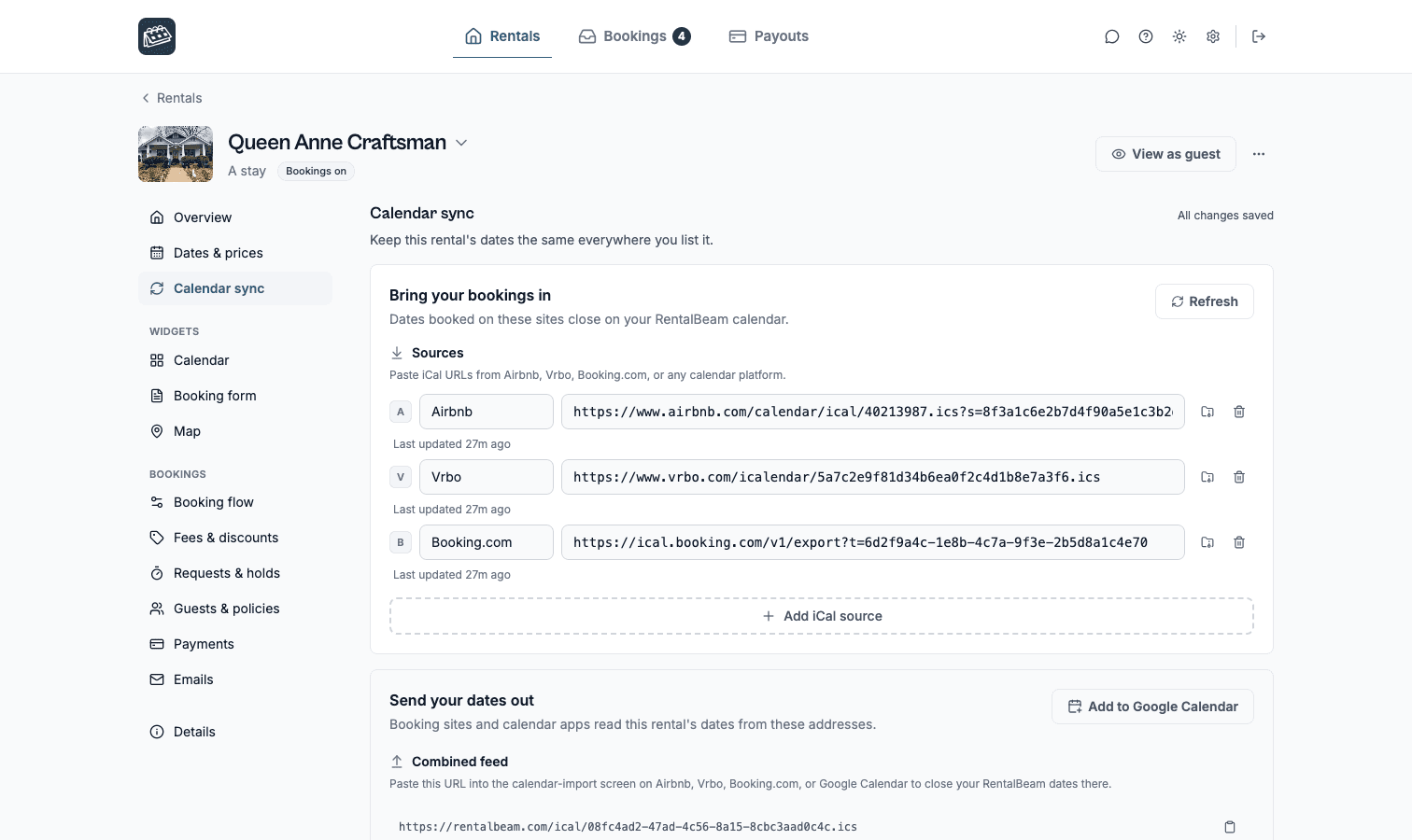
Sync health monitor
Healthy, Not updating, or Can't read status for each source with exact last-sync times.
iCal export URL
Combine your sources, custom blocked dates, and bookings into one shareable feed.
Export access tracking
See when Airbnb, Google Calendar, or Vrbo last fetched your URL, and how often.
Custom date blocking
Block owner stays or maintenance with labels and colors, or open days another site blocked. A guest's stay stays closed. On Plus and Pro.
Embeddable calendar widget
Show live availability on your own site with a responsive, branded widget.
Direct booking form (Pro)
Take reservations with pricing, fees, rules, custom fields, and optional card payments.
One synced calendar, on your own website
Create a free RentalBeam account, connect the same feeds, and put a live availability calendar on your site. No credit card required.